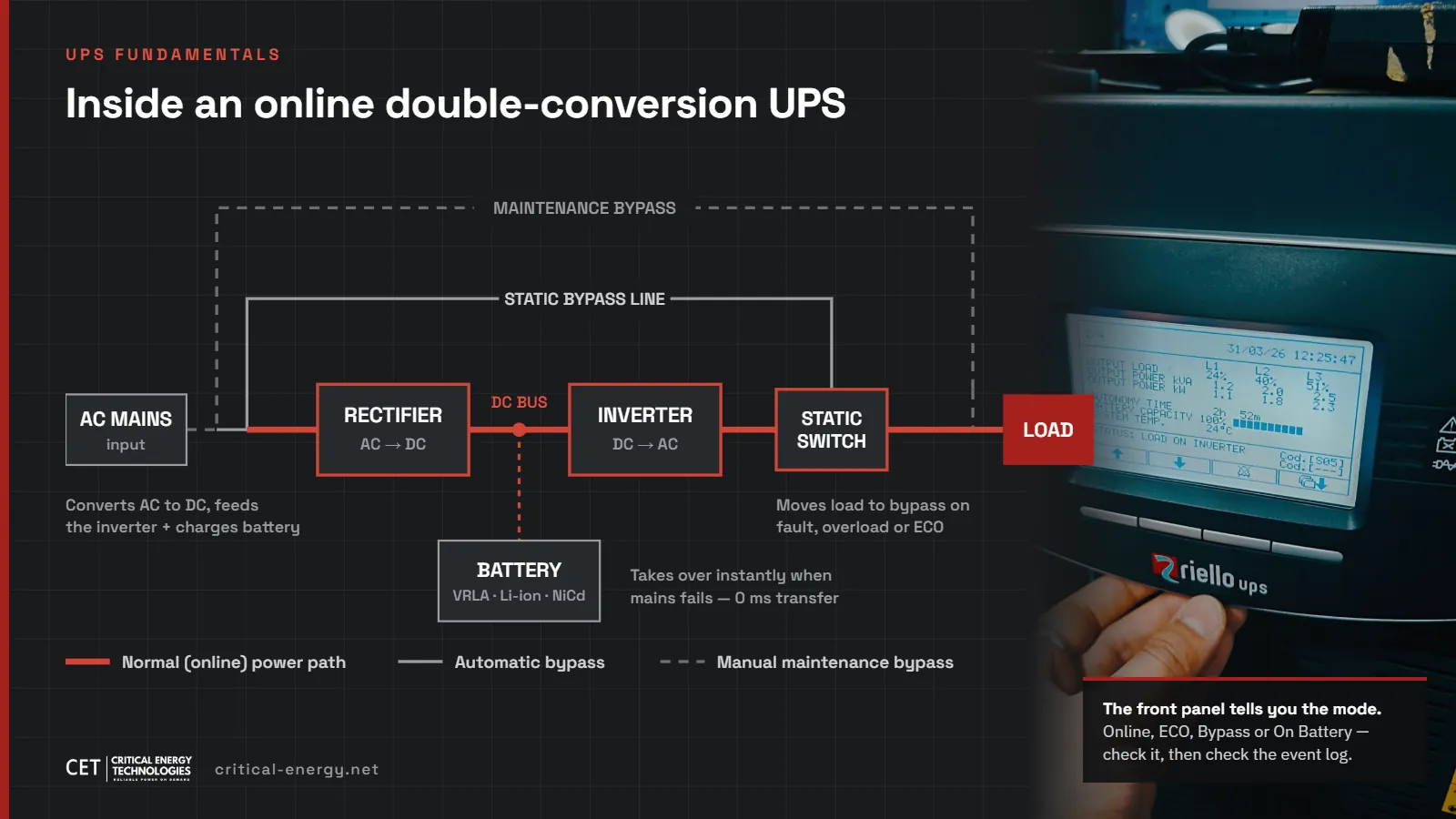
The four UPS operation modes, and when each one earns its place
Efficiency, protection, and the trade-off every critical-power decision comes down to. Verified against IEC 62040-3 and 2025–2026 market data.
Critical Energy Technologies · 8 min read · Updated July 2026
Most people think of a UPS as a box that is either on or off. In reality, a modern online UPS moves between four distinct operation modes, and each one represents a different trade-off between efficiency and protection. If you operate a data room, a clinic, a branch network or a production line, understanding these modes is the difference between assuming you are protected and knowing it.
When engineers specify a UPS, the conversation usually stops at one number: kVA. But the rating only tells you how much load the unit can carry. How it carries that load (its operation mode) determines whether your equipment survives a bad grid day.
The stakes are real: the global data center UPS market is growing from $8.76B in 2025 toward $12.47B by 2030 at a 7.3% CAGR, driven by AI infrastructure and the recognition that protecting a load means more than having a battery. The online double-conversion segment is the fastest-growing at 8.9% CAGR. Here is what every operator needs to know.
Knowing when your UPS switches is knowing when your load is exposed.
The four modes at a glance
| Mode | Load protection | Efficiency | Transfer on mains failure | Use it for |
|---|---|---|---|---|
| Online (double conversion) | Full: load never sees raw mains | ~94–96% | 0 ms | Servers, medical, process control |
| ECO | Partial: load rides on raw mains | Up to ~98% | A few milliseconds | Stable grids, non-sensitive loads |
| Bypass | None: straight utility power | N/A | Already on mains | Faults, overloads, maintenance |
| Battery | Full: clean inverter output | n/a (discharging) | 0 ms | Outages and out-of-tolerance mains |
Online mode: the gold standard
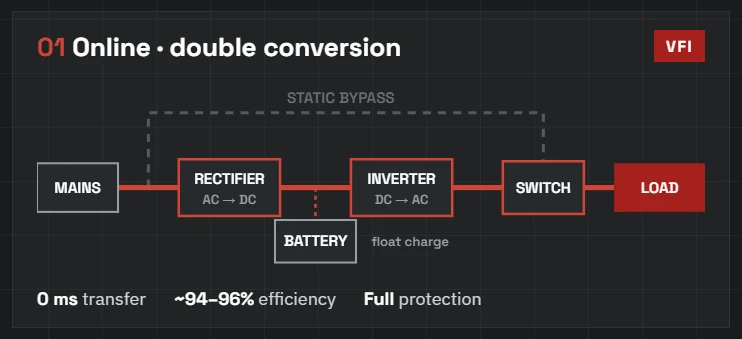
In true online (double-conversion) mode, incoming mains power is converted to DC and then rebuilt by the inverter into a perfect sine wave. The load never sees raw utility power: sags, swells, frequency drift and transients are all absorbed and corrected upstream. Because the inverter is always carrying the load, a mains failure causes zero transfer time: 0 milliseconds. This is the mode classified as VFI (voltage and frequency independent) under IEC 62040-3, and it is where mission-critical loads should live.
ECO mode: efficiency with a catch
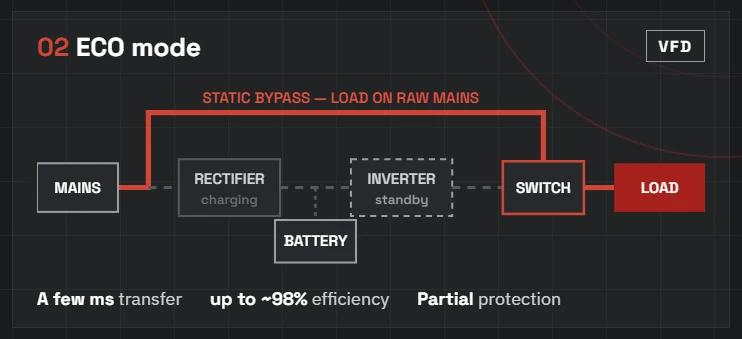
ECO mode feeds the load directly from mains through the static bypass while the inverter idles in standby, pushing efficiency up to around 98%. The catch: the load is exposed to whatever the grid delivers, and when mains fails the UPS must detect the failure and transfer back to the inverter, which typically takes a few milliseconds. For many loads that is fine; for sensitive IT or medical equipment, it may not be. ECO mode is a decision to be made deliberately, not a default to be discovered later.
Bypass mode: naked but sometimes necessary
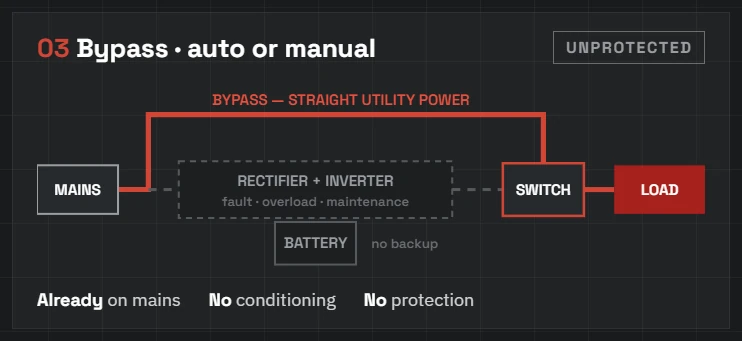
Bypass comes in two forms. Automatic bypass transfers the load to mains instantly when the UPS detects an internal fault or a heavy overload. It is protection of last resort. Manual (maintenance) bypass lets an engineer isolate the UPS for service while the load keeps running on utility power. In both cases the load is unprotected, so time in bypass should be planned, brief and monitored.
Battery mode: the bridge
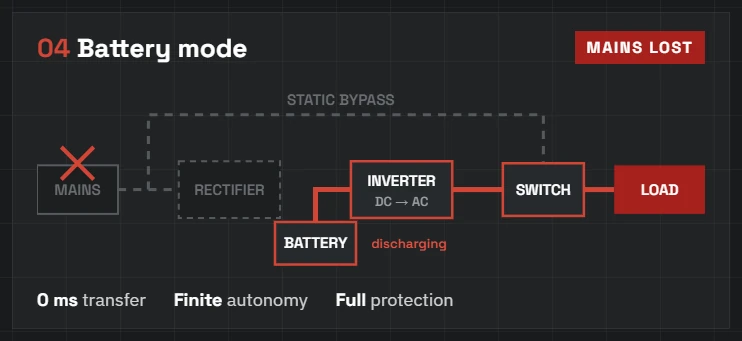
When mains fails or drifts outside tolerance, the UPS draws on its battery and the inverter keeps producing clean output without interruption. Battery mode is a bridge, not a destination: autonomy is finite, which is why battery health, runtime sizing and regular discharge testing matter so much. A UPS with a tired battery string is a UPS in name only.
How do you know which mode your UPS is in right now?
Every online UPS reports its state on the front panel: look for “Online”, “ECO”, “Bypass” or “On Battery”, and for the inverter and bypass status LEDs. The event log tells you more than the display: repeated transfers to bypass or battery are an early warning of grid trouble or an ageing unit. If your UPS is networked over SNMP or a monitoring card, mode changes should raise an alert the moment they happen, not appear in a report three months later.
Frequently asked questions
Online (double-conversion) mode. The load runs permanently on the inverter output, so mains failures cause zero transfer time and grid disturbances never reach your equipment. It is classified VFI under IEC 62040-3.
It depends on the load. ECO mode raises efficiency to around 98% but exposes the load to raw mains and adds a few milliseconds of transfer time when the grid fails. It suits stable grids and non-sensitive loads; it is a poor default for medical or critical IT equipment.
No. In bypass the load runs on straight utility power with no conditioning and no battery backup. Bypass exists for internal faults, overloads and planned maintenance, so time in bypass should be brief, planned and monitored.
Check the front-panel display and status LEDs, review the event log for transfers, and if the unit has an SNMP or monitoring card, configure alerts for every mode change. If you cannot answer the question immediately, schedule a health check.
Know your mode
At Critical Energy Technologies we regularly audit sites where a UPS has quietly sat in ECO or even bypass for months, and nobody noticed until an outage found them. Ask your service partner one simple question: which mode is each of our units in right now, and why? If the answer is not immediate, it is time for a health check. Our engineers size, install and maintain online UPS systems from 1 kVA to 6.4 MVA. Talk to us at info@critical-energy.net.
Related reading: The High Cost of Cheap Power and Summer Power Reliability in Amman.
UPS systems in Jordan
UPS systems we supply and maintain in Jordan
Critical Energy Technologies (CET) supplies, installs and maintains UPS systems across Jordan from Riello UPS (Italy), Legrand UPS (France) and APC by Schneider Electric, plus other manufacturers when a project calls for them. We supply true online double-conversion UPS from 1 kVA to 6.4 MVA: single-phase units for offices and bank branches up to modular and parallel three-phase systems for data centres, hospitals, telecom and industrial plants.
CET brings more than 10 years of hands-on experience in critical and emergency power supply to every project, from the first load survey to commissioning and maintenance. Call +962 77 564 7788, email info@critical-energy.net, or send us your load list for a sized quotation.
 Italy
Italy France
 Schneider Electric
Comments are closed